Devlog 1: December 25 Updates
The Mormon Trail RPG: December Dev Log
Why I'm Building This
Three weeks ago, on my honeymoon, I decided to build a video game. Not because I'm aiming to become a video game designer (although I am actually becoming one), but because I run a creative services company and needed to understand AI tools beyond Instagram reels and hyped out YouTube clickbait.
The thesis was simple: If I can build a complete game using only AI tools with zero prior coding experience, I'd understand exactly where they shine and where they break down, so I can apply them more productively in my life.
I landed on a historically-grounded 2D survival RPG inspired by The Oregon Trail, set during the 1846-1847 Mormon migration west. Full combat system, resource management, event engine, skill trees, the works. A huge world of content to use, and my own imagination for the rest.

Now it's December 1st. The game is roughly 60% complete. And I've learned more about AI-assisted development in three weeks than I would have in three months of reading about it.
Here's the full update.
The Game Structure
The Mormon Trail RPG is built in Godot 4 using GDScript. The architecture breaks down into:
Autoload Singletons (the backbone):
- GameState: Core data model for family, resources, location, stats
- EventManager: Loads and filters 90+ JSON events based on chapter, terrain, faith, persecution
- CombatManager: Handles turn-based battles
Scene Structure:
- TravelScene: Daily trail decisions, pace selection, family actions
- TownScene: Shopping, work, healing, evangelizing with persecution checks
- CombatScene: Turn-based fights against wolves, mobs, spiritual bosses
- CampScene: Rest and recovery mechanics
Data-Driven Content: Everything lives in JSON files. Events, enemies, items, professions, town definitions. The code just reads and executes. This means I can iterate content fast without touching code, which turned out to be critical when you're learning as you go.

The game loop: Pick your profession and starting family. Travel the 1,300-mile route from Nauvoo, Illinois to Salt Lake Valley across 120 turns and 32 historical stops. Manage food, water, health, faith, and persecution. Make decisions that affect family survival. Fight bandits and spiritual bosses. Try not to die of dysentery.
Standard Oregon Trail DNA with deeper mechanics.
The Evolution of My AI Workflow
Note: I am skipping a lot of detail here, but the bottom line is I learned how to do all of this by asking Claude. If you’re not sure, just use your favorite LLM to figure it out!
Phase 1: Claude App Only
Started with Claude Desktop (web interface) & Projects.
The Projects feature became essential. I worked for about a day with Claude to build out my game and all the ideas into what’s known as Game Design Documents (GDD). All of the plan, none of the code. I uploaded all 23 GDD sections covering every game system into the Project files, and Claude could reference them while coding.

Next I simply referenced those files to start building. Every time I described what I wanted, I’d get back directions and GDScript code, copy-paste into files, test in Godot.
This worked for about an hour. I built my first screen manually in Godot, copying and pasting like a maniac. But it was cumbersome and slow.

I’m not sure how, but at some point, I discovered Claude Desktop could build the files for me… sort of. It first couldn’t and I learned that Claude defaults to a temporary file environment to build code trying to use CLI commands. It couldn’t save to my game folder. But Claude is smart. Previously, I enabled the extension to use filesystem commands and after failing a few times, it switched over to these tools.

Bingo. It was now able to create files directly into my Godot game folder with Claude directly and we were off. I built the basic systems. Got distance tracking working. Built the first version of character creation. Implemented simple resource depletion.
But I hit walls fast:
- The context window was too small. By day 3, Claude couldn't remember earlier decisions. I'd get code that contradicted systems built two sessions ago.
- Claude kept forgetting to use the filesystem tools. I had to remind it each time, over and over and over again.
- Aside from basic read, write, search, I couldn’t do much else automatically.
Phase 2: Claude Code in Terminal + Claude App
I’ve been hearing about Claude Code for a while. It’s like the nerdier, harder-working brother of Claude Desktop. It was time I figured this out, otherwise, this game would never get done. A few chats and YouTube tutorials later I launched Claude Code (the CLI tool). This changed everything.
I’d start in the Claude app. Build out what I wanted to do and create the plan/content.
Now Claude could read my entire project directory, see all files, understand how systems connected, write code directly into the correct files, test changes, and debug errors without me copying and pasting. I got access to a zillion other tools as well. Resizing files, uploading to GitHub, and more.
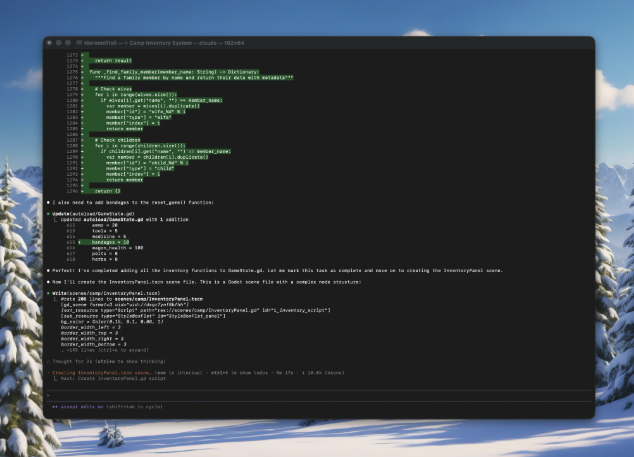
My workflow became:
- Design and create in Claude App
- Open terminal and launch Claude, paste in the content and details from Claude App
- Watch Claude Code write the code across multiple files
- Test the code in game, iterate if needed.
The speed increase was massive. What took 2-3 hours in Phase 1 now took 5 minutes.
This is when the game really came together. Combat system went live. Added 16 enemy types. Built the town system with persecution tracking. Implemented the event engine with proper filtering.
But Claude Code had its own issues:
- It’s not a big thinking tool out of the box - creating big swatches of content was hard
- I couldn't (or rather didn’t yet know how to) easily reference specific documentation the way I could with Projects in Claude Desktop. If I wanted to show Claude a design doc or example code from another project, I had to paste it into the terminal prompt every time.
Multi-step tasks required careful prompting. "First read all the files, then analyze the system, then propose changes, then implement" - breaking it down explicitly.
Phase 2.5: Actually Learning How To Use Claude Code
Eventually, I learned how to use Claude Code correctly.
I discovered the key was .md (markdown) files with all the specifications. And better yet, ask Claude Desktop to build them and create the right prompts for me to use in Claude Code to find and use them.

Turns out I could save all the file locations and any directions to read the files, how to operate, even the project overall in the Claude.md file (the file Claude reads every time you boot it up in terminal and instantly gains context.
The pace increased and so did the game.
Phase 3: Claude App with Integrated Code Execution
When Claude 4.5 Opus dropped with integrated code execution, I switched back to the web interface. They put Claude Code into the desktop app for the best of both: conversational UI with file system access.
This was great for complex decision-making. I could ask "Should the faith system use a linear or exponential growth curve?" and Claude would analyze the game design implications before suggesting code. I then could flip right into Claude Code to execute.

I built the skill system this way. The progression framework. The polygamy mechanics. These required understanding interconnected systems and design philosophy, not just writing code.
But performance started degrading:
- The integrated Claude Code execution was slower than Claude Code in Terminal. Running tests or debugging would sometimes hang.
- For rapid iteration on content (adding events, tuning balance, adjusting item stats), the web interface was still needed
- Claude Code in the app got messy fast (a bug prevented me from naming chats, and overall, I was switching to the CLI mode inside of the interface to access more tools I couldn’t from the basic chat
Phase 4: Back to Claude Code + Claude App (Days 18-Present)
This is where I am at today. And it’s working great.
Claude Code (terminal) for:
- Implementation of defined features
- Debugging specific issues
- Rapid iteration on content
- System integration work
- Performance-critical changes
- Building custom agents to focus on specific work
- MCP integrations (like with PixelLab) to pull in more tools
Claude App for:
- System architecture decisions
- Design discussions
- Complex problem-solving
- Documentation review
- Understanding interconnected implications
Concrete example from yesterday:
I needed to implement the skill unlock system where players learn new abilities through 3 consecutive days of Family Worship.
First, I used Claude App to discuss the design: Should this block other actions? How does it interact with the turn system? What happens if interrupted?
Claude built the .md files for our plan, and the prompt for Claude Code to get started.

Then I jumped to Claude Code with a simple reference to the document: “Review /user/folder/SKILL_FEATURE.md and get started.”
Done in 20 minutes. Plan reviewed, code written across 4 files, fully integrated, tested, working.
This hybrid approach is 40-50% faster than either tool alone.
Key AI Workflow Lessons:
- Break context into manageable chunks. Don't try to have Claude understand your entire game in one conversation. Build systems one at a time, document them, then reference that documentation in future sessions.
- Use Projects feature aggressively. Upload every design doc, system spec, and architectural decision. Claude can reference them without eating your context window.
- Be explicit about file structure. When using Claude Code, start sessions with "First, list all files in the project directory and understand the current structure." Prevents phantom files and broken imports.
- Test incrementally. Don't ask Claude to build 5 systems at once. Build one, test it in Godot, verify it works, then move to the next. Debugging 5 broken systems is exponentially harder than debugging one.
- Learn when to switch tools. Design discussions in Claude App, implementation in Claude Code, rapid content iteration back in Claude Code, integration testing verification in Claude App. Use the right tool for the right task.
Current State
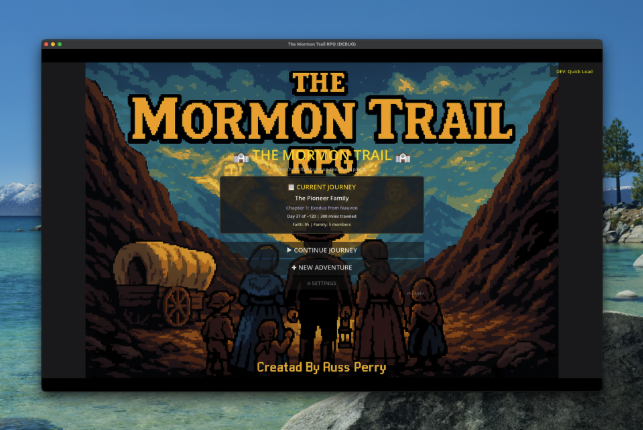
As of December 1st, the game has:
Complete Systems:
- 8 professions with unique skills and starting conditions
- Character creation with family building
- Full daily turn loop (trail/town/camp cycles)
- Turn-based combat with 16 enemy types
- Event engine with 90+ historically-sourced events
- Town system with persecution tracking
- Faith system with revelation tiers
- Death mechanics with LDS afterlife messaging
- Weather system affecting travel and resource consumption
- 32 historical stops from Nauvoo to Salt Lake Valley
In Progress:
- Skill learning mechanics
- Polygamy system with wife role selection and conflict events
- Chapter boss battles with cutscene integration
- Advanced resource economy with crafting
- Health and sickness systems
What's Next
December roadmap:
- Balance the game - it’s too easy, not enough death like the original Oregon Trail
- UI/UX polish - Claude doesn’t have a great design eye out of the box, so I need to fine tune windows buttons, etc.
- Graphics - very little visuals currently. Loving PixelLab’s MCP connection to create things directly with Claude Code
- Content expansion - more random events, balance economy, tune combat difficulty across all enemy types.
- Polish and first playable build. UI improvements, bug fixes, web export testing.
My goal is to have a complete game that's genuinely fun to play by Christmas.
Then I'll decide if this becomes a real release or just the most elaborate AI learning exercise ever.
—
Want to follow along? I'm documenting the whole process on my YouTube channel.
Now, if you'll excuse me, I have a polygamy system to finish. Some historical accuracy challenges are more interesting than others.
Leave a comment
Log in with itch.io to leave a comment.